Blazor Web Apps in 2026: Render Modes, Architecture, and When to Choose It Over Next.js
1. Introduction: Why Blazor Deserves Another Look
For many developers outside the .NET ecosystem, Blazor is often perceived as Microsoft's attempt to compete with React, Angular, or Vue. That perception is understandable but increasingly inaccurate.
Modern Blazor has evolved significantly, especially following the introduction of Blazor Web Apps in .NET 8 and the continued improvements in .NET 9 and .NET 10. Today, Blazor offers something that very few web frameworks can provide:
A truly fullstack development experience using a single language, runtime, tooling ecosystem, and deployment model.
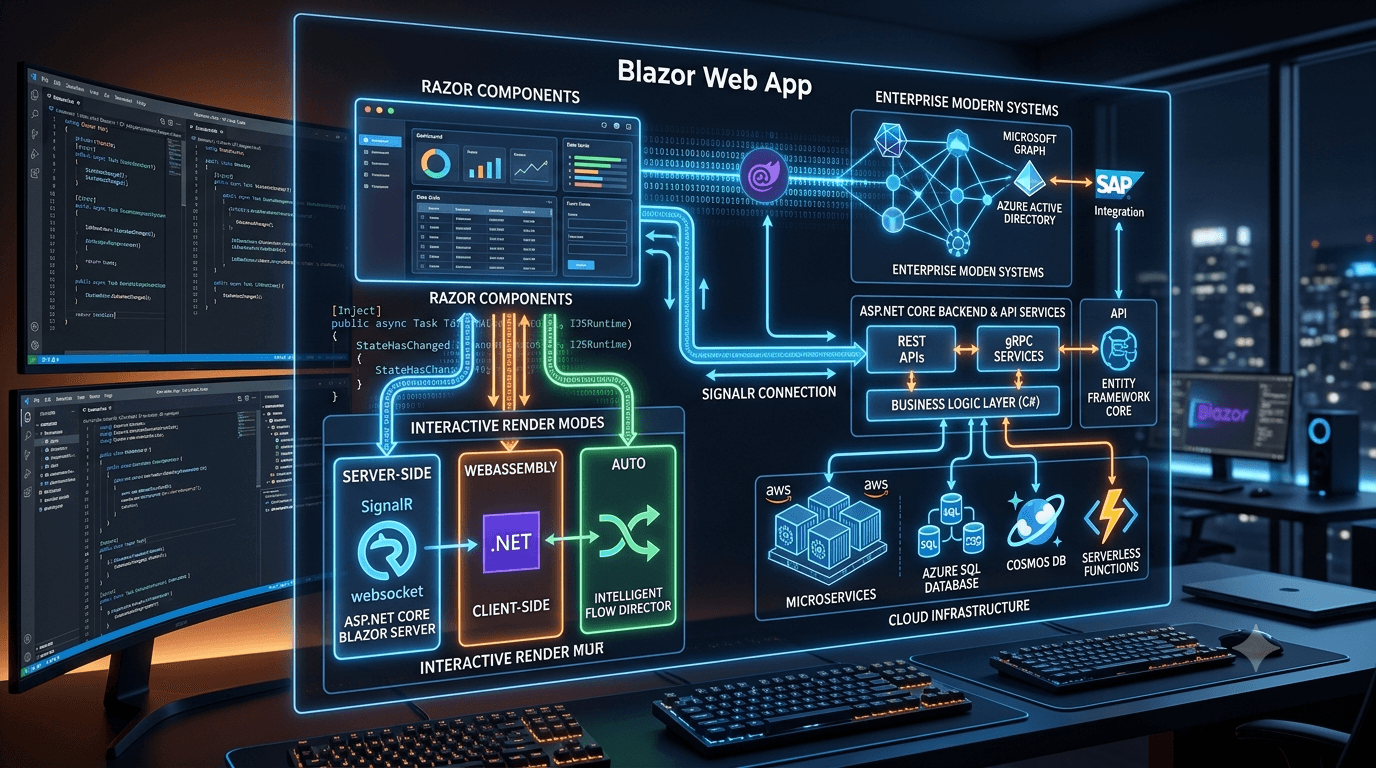
Instead of maintaining separate stacks for frontend and backend development, which usually involves writing TypeScript on the frontend and C#, Java, or Go on the backend, teams can build complete web applications using a unified setup. The entire project runs on C# and ASP.NET Core, utilizing Razor Components for UI, Entity Framework Core for data access, SignalR for real-time websocket synchronization, and standard .NET CLI tooling.
This cohesion eliminates the friction of managing distinct build systems, package registries, and serialization boundaries. In this article, we'll dive deep into the architecture of modern Blazor, its component rendering model, its performance profiles, and how it stacks up against frontend-heavy frameworks like Next.js in real-world scenarios.
2. Understanding the Evolution of Blazor
Historically, developers viewed Blazor through two isolated hosting models: Blazor Server and Blazor WebAssembly.
Blazor Server executed components on the server. Whenever a user interacted with the UI, events were sent to the server over a persistent SignalR (WebSocket) connection, the component was re-rendered, and a diff of the DOM was sent back to the browser to update the page. This kept initial downloads tiny but meant that any latency in the network translated directly into UI lag.
Conversely, Blazor WebAssembly executed C# directly inside the browser using a WebAssembly-based Mono runtime. The application was fully downloaded, meaning it could run completely client-side. The downside was a slow initial load time as the user waited for the runtime, libraries, and compilation artifacts to download.
While both models were functional, they forced developers into an all-or-nothing architectural decision at the project level. Modern Blazor Web Apps solve this by introducing a component-level model where you can mix and match rendering strategies within a single application:
Blazor Web App (Flexible Component-Level Architecture)
│
├── Static Server-Side Rendering (Static SSR) - Default for page loading and SEO
├── Interactive Server - Runs on the server, updates UI via SignalR connection
├── Interactive WebAssembly - Runs in browser via WASM, reduces server footprint
└── Interactive Auto - Renders with Server first, switches to WebAssembly once loaded
This hybrid architecture means you can serve static marketing or informational pages with high-performance Static SSR, while setting only the complex, data-heavy dashboard widgets to run interactively via SignalR or WebAssembly.
3. The Fullstack C# Advantage
The true advantage of Blazoris not just running C# in the browser; it is the elimination of the validation and compilation gap between your database models and your user interfaces.
In a traditional React/Next.js setup backed by a .NET Web API, developer productivity is continuously taxed by duplication. You must maintain C# DTOs on the backend, mirror them as TypeScript interfaces on the frontend, write client generators, configure CORS, and implement validation rules in both languages.
For example, a React developer might write:
// frontend/models/Product.ts
import { z } from 'zod';

export interface ProductDto {
  id: string;
  name: string;
  price: number;
}

export const ProductSchema = z.object({
  name: z.string().min(3, "Name must be at least 3 characters"),
  price: z.number().positive("Price must be positive"),
});
Meanwhile, a backend engineer writes:
// backend/DTOs/ProductDto.cs
using System.ComponentModel.DataAnnotations;

public record ProductDto(
    Guid Id,
    [Required, MinLength(3)] string Name,
    [Range(0.01, double.MaxValue)] decimal Price
);
With Blazor, these models are written once in a shared Class Library. The exact same record is referenced by both your backend APIs and your frontend Razor components:
// Shared/DTOs/ProductDto.cs
using System.ComponentModel.DataAnnotations;

namespace Shared.DTOs;

public class ProductDto
{
    public Guid Id { get; set; } = Guid.NewGuid();

    [Required(ErrorMessage = "Name is required")]
    [MinLength(3, ErrorMessage = "Name must be at least 3 characters")]
    public string Name { get; set; } = string.Empty;

    [Range(0.01, double.MaxValue, ErrorMessage = "Price must be positive")]
    public decimal Price { get; set; }
}
In your Razor Component, you bind directly to this model, enforcing validation on the client instantly while reusing the data annotations:
@using Shared.DTOs
@page "/add-product"

<h3>Create New Product</h3>

<EditForm Model="@Product" OnValidSubmit="HandleSubmit" FormName="AddProductForm">
    <DataAnnotationsValidator />
    <ValidationSummary />

    <div class="form-group mb-3">
        <label for="name">Product Name</label>
        <InputText id="name" @bind-Value="Product.Name" class="form-control" />
        <ValidationMessage For="@(() => Product.Name)" />
    </div>

    <div class="form-group mb-3">
        <label for="price">Price</label>
        <InputNumber id="price" @bind-Value="Product.Price" class="form-control" />
        <ValidationMessage For="@(() => Product.Price)" />
    </div>

    <button type="submit" class="btn btn-primary">Save Product</button>
</EditForm>
@code {
    private ProductDto Product { get; set; } = new();

    private void HandleSubmit()
    {
        // Model validation has already succeeded here
        Console.WriteLine($"Saving product {Product.Name} with price {Product.Price}");
    }
}
This direct model reuse eliminates mapping errors, speeds up features, and ensures that model changes immediately propagate throughout your entire code structure.
4. Render Modes: Blazor's Most Important Feature
To master Blazor, you must understand its four core rendering modes and how they are configured at runtime.
i) Static Server-Side Rendering (Static SSR)
By default, components are rendered as flat HTML on the server. The client browser receives raw markup. This mode provides fast initial rendering and search-engine indexability. However, event handlers like @onclick will not work because there is no active connection or browser runtime to handle them. Blazor supports Enhanced Navigation in this mode: when a user clicks a link, Blazor intercepts the request, fetches the target page's HTML in the background, and dynamically swaps the page body, preventing a full page reload.
ii) Interactive Server
Specified via @rendermode InteractiveServer. The page is rendered statically on the server first, but then a WebSocket connection is initialized via SignalR. All browser interactions (mouse clicks, keystrokes, form submissions) are sent to the server. The server processes the events, runs the component lifecycle, determines UI differences, and transmits lightweight DOM patches back to the browser.
- Code implementation:
  @page "/counter-server"
  @rendermode InteractiveServer

  <p>Current count: @currentCount</p>
<button class="btn btn-primary" @onclick="IncrementCount">Click me</button> @code {
private int currentCount = 0;
private void IncrementCount() => currentCount++;
}iii) Interactive WebAssembly
Specified via @rendermode InteractiveWebAssembly. The application executes directly inside the browser using a WebAssembly runtime. After the initial assets download, all code runs client-side. The component can talk directly to public HTTP endpoints.
- Code implementation:
  @page "/counter-wasm"
  @rendermode InteractiveWebAssembly
  @inject HttpClient Http

<p>Status: @statusMessage</p>@code {
private string statusMessage = "Loading...";
protected override async Task OnInitializedAsync()
{
var result = await Http.GetFromJsonAsync<WeatherResponse>("/api/weather");
statusMessage = $"Loaded {result?.Length} forecasts";
}
}iv) Interactive Auto
Specified via @rendermode InteractiveAuto. This combines Server and WebAssembly. On the first page load, the page renders interactively over a SignalR connection. Meanwhile, the WebAssembly binaries are quietly downloaded in the background. On subsequent visits, the application bypasses the WebSocket connection entirely and starts instantly in WebAssembly. This delivers the speed of Server-Side Rendering with the local execution benefits of WebAssembly.
5. Building Fullstack Applications Without a Separate Frontend Stack
One aspect that surprises developers transitioning from the Node/React world is the architectural simplification of a Blazor Web App. In a standard React application, you maintain separate repositories, build scripts, deploy environments, and environment variables.
With Blazor, your architectural structure is contained within a single solution:
InventoryManagement/
│
├── InventoryManagement.sln
│
├── Shared/                     # DTOs, interfaces, common validation rules
│   └── Shared.csproj
│
├── Client/                     # Blazor WebAssembly components (Interactive parts)
│   ├── Client.csproj
│   └── Pages/
│
└── Server/                     # Entry point, APIs, Database contexts, Middlewares
    ├── Server.csproj
    ├── Program.cs
    └── Controllers/
In Program.cs on the server, you configure the Blazor middleware to coordinate your endpoints and UI components seamlessly:
using Microsoft.AspNetCore.Identity;
using Microsoft.EntityFrameworkCore;
using InventoryManagement.Server.Data;
using InventoryManagement.Client.Pages;

var builder = WebApplication.CreateBuilder(args);

// Add services to the container.
builder.Services.AddRazorComponents()
    .AddInteractiveServerComponents()
    .AddInteractiveWebAssemblyComponents();

builder.Services.AddDbContext<ApplicationDbContext>(options =>
    options.UseSqlServer(builder.Configuration.GetConnectionString("DefaultConnection")));

var app = builder.Build();

// Configure the HTTP request pipeline.
if (app.Environment.IsDevelopment())
{
    app.UseWebAssemblyDebugging();
}
else
{
    app.UseExceptionHandler("/Error", createScopeForErrors: true);
    app.UseHsts();
}

app.UseHttpsRedirection();
app.UseStaticFiles();
app.UseAntiforgery();

app.MapRazorComponents<App>()
    .AddInteractiveServerRenderMode()
    .AddInteractiveWebAssemblyRenderMode()
    .AddAdditionalAssemblies(typeof(InventoryManagement.Client._Imports).Assembly);

app.Run();
Because your frontend and backend run in the same process during development, debugging is incredibly cohesive. You can set a breakpoint in your Razor component, step directly into your service layer, step into Entity Framework database queries, and watch values resolve, all within a single debugging session.
6. State Management and Component Architecture
State management in Blazor differs slightly from React since it does not rely on a virtual DOM reconciliation engine built on JavaScript primitives. Instead, Blazor components manage state internally or delegate state propagation to dependency-injected services.
For component communication and local state tracking, a common best practice is the State Container pattern. Here is a simple implementation:
// Shared/Services/AppStateContainer.cs
namespace Shared.Services;

public class AppStateContainer
{
    private string? _selectedCategory;

    public string? SelectedCategory
    {
        get => _selectedCategory;
        set
        {
            _selectedCategory = value;
            NotifyStateChanged();
        }
    }

    public event Action? OnChange;

    private void NotifyStateChanged() => OnChange?.Invoke();
}
You register this service as a Scoped service in your Dependency Injection container so it exists for the duration of a user's session:
builder.Services.AddScoped<AppStateContainer>();Then, you inject it and subscribe to state changes in your Razor components:
@inject Shared.Services.AppStateContainer
@implements IDisposable

<div class="category-display">
    <p>Selected Category: <strong>@AppState.SelectedCategory</strong></p>
</div>@code {
protected override void OnInitialized()
{
AppState.OnChange += StateHasChanged;
}
public void Dispose()
{
AppState.OnChange -= StateHasChanged;
}
}For highly complex, global state updates across massive enterprise apps, you can adopt Redux-like libraries such as Fluxor, which introduce actions, reducers, and central stores to maintain rigid architectural boundaries.
7. Authentication and Enterprise Integration
Enterprise integration is one of Blazor's strongest features. Out of the box, it hooks into ASP.NET Core’s security stack, meaning it natively supports cookie-based authorization, JWT tokens, OpenID Connect (OIDC), OAuth2, and enterprise identity management systems like Entra ID (Active Directory), Keycloak, or Auth0.
Instead of writing complex client-side token storage, token refresh interceptors, and local storage guards, you use standard ASP.NET Core abstractions. For example, to secure page sections or conditionally show parts of the interface depending on user privileges, you wrap elements in the <AuthorizeView> tag:
@page "/dashboard"
@attribute [Authorize]

<h3>Executive Dashboard</h3>

<AuthorizeView Roles="Admin">
    <Authorized>
        <div class="alert alert-success">
            You are logged in as an Administrator. You have full database access.
        </div>
        <button class="btn btn-danger">System Operations</button>
    </Authorized>
    <NotAuthorized>
        <p>You do not have access to administrative controls.</p>
    </NotAuthorized>
</AuthorizeView>
Behind the scenes, Blazor passes authorization contexts down to all routing and component handlers via CascadingAuthenticationState. If a user is not authenticated, they can be automatically redirected to your identity server at the routing layer without loading frontend code.
8. Performance Considerations and Common Misconceptions
The most frequent criticism directed at Blazor is that WebAssembly payloads are too large or that SignalR connections degrade under high latency. While these concerns are structurally valid, they are often exaggerated or stem from misconfigured applications.
To optimize Blazor application performance:
- Leverage Ahead-of-Time (AOT) Compilation: While AOT compilation increases the initial download size because it compiles C# code into native WebAssembly instead of interpreting MSIL bytecode, it increases processing execution speed by up to
10x. This is critical for applications performing client-side math, cryptography, or rendering heavy tables. - Minimize Render Triggers: In Blazor, components re-render when they receive new parameters or trigger event handlers. You can control this process by overriding
ShouldRender:
protected override bool ShouldRender()
   {
       // Only re-render if database attributes actually changed
       return _hasDataUpdated;
}- Use Streaming Rendering: For pages loaded via Static SSR, you can stream data as it becomes available:
@page "/weather"
   @attribute [StreamRendering]

   @if (forecasts == null)
   {
       <p><em>Loading weather data...</em></p>
   }
   else
   {
       <!-- Render data table -->
   }
This delivers the immediate HTML structure to the user first, and streams the populated data down once database fetches complete.
9. Blazor vs Next.js: Architectural Tradeoffs
When evaluating Blazor and Next.js, the decision is rarely about performance. Both frameworks can deliver blazingly fast web experiences if designed correctly. Instead, the choice is defined by team skills, system boundaries, and business requirements.
| Capability | Blazor | Next.js |
|---|---|---|
| Primary Language | C# | TypeScript / JavaScript |
| Code Sharing | Direct library linking (EF models, shared validators) | Shared JSON schemas / custom client generators |
| SEO Optimization | Strong (Static SSR, Streaming SSR) | Excellent (Static Exports, Server Components) |
| Client Payload | Larger (WASM runtime & standard DLL libraries) | Smaller (Optimized tree-shaken JS bundles) |
| Ecosystem Size | Smaller, focused on enterprise .NET packages | Massive, access to millions of npm libraries |
| Client-Server Border | Seamless via SignalR or HttpClient configurations | Boundaries managed by API routing and fetches |
| State Management | Scoped DI services, State Containers, Fluxor | Context, Redux, Zustand, Recoil |
| Deployment Model | ASP.NET Core server hosting or Azure App Service | Serverless (Vercel, AWS) or Docker |
10. When Blazor Is an Excellent Choice
Blazor is a fantastic option in scenarios where the application is highly interactive, database-centric, and built inside a corporate infrastructure.
- Enterprise Dashboards & ERPs: Business-to-business (B2B) applications, enterprise portals, and systems requiring complex data models and rich validation logic.
- Teams with Existing .NET Experience: If your engineers are already experts in
C#,Entity Framework, andVisual StudioorRider, the learning curve is minimal. They can build complete UIs immediately without needing to learn React state systems, JavaScript build tools, or webpack.
- Internal Tools & Portals: Applications where payload size is not a major concern because users are running on corporate LANs, and where developer iteration speed is critical.
11. When Next.js Is Probably the Better Tool
Next.js is the better option when your application is a public-facing B2C product, a content-heavy site, or a project targeting mobile clients over poor networks.
- Public E-commerce & SaaS Portals: Where absolute minimum bundle size, instant time-to-interactive, and global CDN deployments are core business requirements.
- Content Platforms & Blogs: Where static generation and advanced image optimization are needed to improve search engine rankings.
- Teams with React / JS Expertise: If your development pipeline is built around frontend engineers, Next.js leverage their knowledge of CSS-in-JS, Tailwind, and React design patterns.
12. The Tradeoff Most Developers Miss
The most under-appreciated cost in software engineering is not server hosting fees; it is maintenance and developer context switching.
When building an application with a split frontend/backend stack (e.g., React and Spring Boot or React and .NET Core), you pay a recurring cost on every single feature. A simple change like adding a field to a model forces your developers to modify files across multiple codebases, update validation rules in two systems, rebuild APIs, and coordinate deployments.
By consolidating everything into a single language and runtime with Blazor:
- You use the same IDE, testing library, and debugger for both UI and API.
- You can write unit tests that validate the entire user flow from the DOM down to database mocks using libraries like
bunit.
- You eliminate the cognitive friction of switching between JavaScript and C# syntax several times a day.
For teams looking to maximize output with limited resources, this reduction in operational overhead is often worth the architectural tradeoffs.
13. Conclusion
Blazor is no longer an experimental framework or a niche alternative for Microsoft enthusiasts. The introduction of component-level render modes has transformed Blazor Web Apps into a modern, enterprise-ready platform.
The question is not whether Blazor is "better" than Next.js. The question is: which tool matches your;
operational limits,engineering capabilities, andarchitectural goals?
If you have an established .NET backend and want to build powerful fullstack applications with high developer velocity, Blazor is a compelling choice that deserves your attention.
Share this article
If you found this post helpful, feel free to share it with your network!
About the Author